Thursday, August 25, 2011

Computing » New Phones, New Carriers, New Lines: Apple's Future Is Wild

Posted by echa 5:03 AM, under | No comments

New Phones, New Carriers, New Lines: Apple's Future Is Wild | New Phones As Apple fanatics wait with bated breath for an iPhone 5 announcement, vague reports of a completely new Apple product line bubbled to the surface. Elsewhere, Apple asked iOS developers to give users a little more privacy, and the iPhone may take on yet another U.S. wireless carrier soon.

As the summer draws to a close, Cupertino-watchers grow increasingly anxious for the big announcement proclaiming the iPhone 5's release date. New hardware is almost certainly on the menu, and a new U.S. carrier may join the iPhone family as well. Sprint (NYSE: S) will soon start carrying Apple's (Nasdaq: AAPL) smartphone, according to a report in The Wall Street Journal, which cited unnamed sources.

However, it may still be several weeks before rumors and unconfirmed reports turn into solid dates and product details.

Some Apple hounds were so anxious for news from the company this week that they contemplated vague reports from Asian suppliers that the tech giant could be introducing a gadget line so innovative and ahead of the curve that it could represent and entirely new product line. Reports didn't provide many details but speculated it could be a line of touch-enabled desktop-like computers.

"They're at a point, and a size and scale, where there always seems to be something coming, and the competition always seems to have something coming so they've got to stay ahead," Edward Zabitsky, principal and CEO of ACI Research, told MacNewsWorld.

Financial soothsayers, though, seem more focused on the company's future in areas like cloud offerings and its existing mobile lines.

"What's really happening is that we're moving toward light computing and these OSes that have been optimized and developed for mobile are really OSes for interface with the cloud. So over a long period of time they'll be migrating these light OSes -- that's the direction the industry is moving," said Zabitsky.

With the focus on the cloud, in particular its upcoming iCloud offering, Apple can really dig into its loyal, core user base to generate revenue and a truly streamlined product and consumer foundation.

"Apple is really focusing on the iCloud and Apple Me products. Apple can offer a free e-mail system, and I think people would rush up to have @me.com addresses. This is where it's headed, and it can be a pretty big thing," Hendi Susanto, analyst at Gabelli, told MacNewsWorld.

Apple did not respond to a request for comment.

Privacy, Please

As for iPhones, Apple hasn't revealed when customers can start lining up for their upgrades, but it did make one announcement regarding changes to the iOS platform when it debuts. Apple asked developers to refrain from using a Unique Device Identifier (UDID) when creating iOS 5 apps.

The UDID is used in multiple apps, usually involving ads and gaming, and can allow a developer or a third party to collect personal data about the user. That data can be helpful for developers as they broaden their apps and personalize ads or games for certain demographics, but many users have voiced their opposition to what they see as a personal invasion.

That access to information has led to PR headaches that apparently just aren't worth it moving forward, so it's asked developers not to include the data in upcoming apps.

As consumers become more focused on online security and preventing data theft, that practice may become the industry standard.

"Once you put GPS on a device and you build a platform to use the GPS, there are always people who will misuse it. We're becoming more sophisticated, not just the market but the handset vendors. It's just something that needs to be corrected. It's not an Apple-specific problem, but providing an interface with GPS is a dangerous kind of thing with a few developers," said Zabitsky.

Since privacy concerns exist across the board, this probably won't lead to an exodus of developers flocking to different platforms.

"I don't think it's going to result in any dent because I do think that other companies like Google (Nasdaq: GOOG) will also follow suit and this will still be an equal playing field," Susanto said.

Product Rumors

Whispers about the iPhone 5's release date remain focused on October. Since networks' high-speed 4G LTE technology started making its way onto the scene, the idea has been tossed around that the iPhone 5 will be the first Apple phone with 4G connectivity. Some reports have indicated that suppliers confirmed the company was testing with 4G networks, but as the release date draws closer, it seems less likely the iPhone 5 will come equipped with LTE.

"Apple always wants to be leading edge, but not bleeding edge. Their standard of quality is that you need 10 hours of battery life, and obviously those radios could cause a power drain. Apple, for now, it appears, have sought to side with caution making sure that the technology is up to their standards. It's a tradeoff," said Zabitsky.

Another product that is likely being held off so as not to compromise quality is the iPad 3. A while back, rumors suggested Apple's next tablet would be on shelves for the holidays, and although there were rumors it entered production this week, it probably won't be available for consumers until after the holiday rush.

"I think that the current Apple supply chains still couldn't meet a high production yield, specifically for displays, because Apple wants to provide a much higher resolution for its new iPad. It might be pushed to early next year," said Susanto.

Computing » Fighting the Good Global Cybercrime Fight: Q&A With Security Guru Mikko Hypponen, Part 2

Posted by echa 4:57 AM, under | No comments

Fighting the Good Global Cybercrime Fight: Q&A With Security Guru Mikko Hypponen, Part 2 "First, back up! It should be off-site, whether in the cloud or in a removable disk that you take to your grandmother's house. It doesn't have to be daily, either -- for most home users, a backup from last month is good enough. Failing that, though, if something happens, you'll lose a part of your life."

Mikko Hypponen has spent the past 20-plus years studying malicious software, including everything from "Brain" -- the first PC virus, dating back to 1986 -- all the way up to Stuxnet and today's most sophisticated global malware.

He's widely considered one of the world's foremost experts on information security, and he's played a key role in taking down numerous international rings of cybercriminals.

TechNewsWorld recently had a chance to speak with Hypponen about his views on the need for a new model of law enforcement in order to fight global cybercrime effectively. That discussion is presented in Part 1 of this two-part series.

Given the ongoing debate about the relative merits of the various operating systems and platforms when it comes to security, however, we asked him to share his thoughts on that topic as well.

TechNewsWorld: It seems the majority of malware targets Windows. Do you think that's just because of its ubiquity, or is there also something about the technology that's weaker?

Mikko Hypponen: It's a complicated issue. If we separate computers and smartphones, we have computers running Windows, OS X and Linux on one side, and we see much the same spread on the smartphone side with Windows Phone, iOS and Android.

On the computer side, Windows gets almost all the attacks, but on the smartphone side, it's Android that is getting hammered. Windows, meanwhile, doesn't get targeted at all on the phone side.

It's really not a fair comparison, though, because it's mostly about market share. We find more computer malware every day, but it's unfair to consider Windows as one group. In fact, we really have Windows XP, Vista and Windows 7.

Of the three different versions of Windows, OS X and Linux, Windows XP is definitely the least safe. It's 11 years old, and it also has the biggest market share, with 50 percent globally -- Win 7 has just 20 to 23 percent.

Attackers have never had it so good. Not only is XP the weakest, but it's also the most popular. Attackers have low-hanging fruit to enjoy as long as there is such a huge target.

TNW: How would you compare Mac vs. Linux vs. Windows for their ability to prevent or mitigate attacks? Which would you recommend?

Hypponen: For the average beginner user, I'd recommend a Mac. It's easy -- easier to maintain than Linux, and the likelihood of getting infected is much lower than with Windows. Macs represent just three to four percent of the market globally.

But any feeling of superiority for Mac or Linux users is not the right attitude. They also have problems with phishing and spam -- those target everyone.

TNW: How would you compare open source vs. proprietary software in general in this context?

Hypponen: The truth is that pretty much nobody looks at source code and tries to find bugs. In that way, the 'theory of many eyes' doesn't work.

What is the big difference with open source software, however, is that when any vulnerabilities are found, anybody can fix it. When the code is closed, on the other hand, only the vendor can fix it.

We see open source apps getting targeted all the time, such as Firefox and Chrome. So do Flash plug-ins, etc. The practical differences aren't that large, but with open source, the fixes are generally available much faster.

TNW: For greatest security, which operating system should a person use?

Hypponen: For beginners, I'd recommend a Mac, as I said. For expert users, though, I'd say some Linux distribution, or if you prefer Windows, 64-bit Win 7. There is a big difference between the 32-bit model and 64-bit Windows, such as in loading drivers.

Of course, if you really want to split hairs, you could argue that the version of Windows inside the Microsoft (Nasdaq: MSFT) Xbox 360 is the most secure. The only networking is encrypted IP6, for example.

Of course, it's not really a fair comparison, since it's inside a console. Win Phone is also very secure, but it's also much more closed.

TNW: What other steps do you recommend to keep users' computers and data safe?

Hypponen: First, back up! It should be off-site, whether in the cloud or in a removable disk that you take to your grandmother's house. It doesn't have to be daily, either -- for most home users, a backup from last month is good enough. Failing that, though, if something happens, you'll lose a part of your life.

Also, make sure you're up to date with the latest version of the software, regardless of the operating system you use.

If you're on Windows, run an antivirus and use a separate firewall. If you're on a laptop and use WiFi hotspots, make sure you have some kind of VPN.

Say you're working at Starbucks (Nasdaq: SBUX). I recommend using VPN even if you're just using Facebook, simply for the encryption. Then it doesn't matter if someone else in the coffee shop is snooping. Home users, especially, tend to ignore this completely.

Finally, especially if you're on Windows, make sure you're really running an antivirus, and don't just think you are. It's become a standard feature for malware, if it manages to bypass your antivirus one time, to uninstall it and replace it with something else.

So, just because you installed some antivirus software half a year ago, don't assume it's still working. Double-check to make sure it works and that it's still updating.

Computing » Pybackup Makes Saving and Restoring Easy as Pie

Posted by echa 4:52 AM, under | No comments

Computing » Pybackup Makes Saving and Restoring Easy as Pie Not having a backup strategy for your computers is much like not having anti-intrusion protection. For any solution to work well, you must have a product that provides what you need. Then you must actually use the product regularly. That is what I like about pybackpack. I set it to update my backup file set at specific time intervals. Then if I should need to restore my system files, I click the restore button, and it is done.
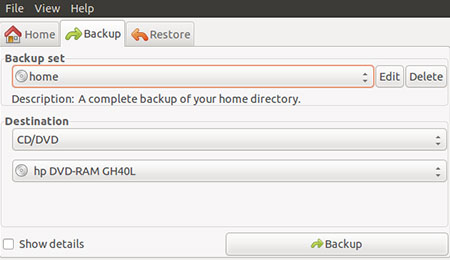
Sure, we all know that making regular file backups is an essential survival task for frustration-free computing. But backing up data and backing up computer systemfiles are not entirely the same things. Doing one without the other is like having an uninterrupted power supply (UPS) that's not connected.

Pybackpack Backup | PybackpackFor instance, you no doubt have multiple copies of your critical data. But how many copies do you have of your Linux desktop home folder? Chances are that unless you have already been burned by a system crash, you see no need to back up your system files.

Rather than suffer that burning sensation, get preventative relief with File Backup Manager. At least, if you run Ubuntu Linux, that is what Canonical's distro calls this backup option. Its more generic name is "pybackpack." It is an easy-to-use file backup tool written for the Gnome desktop environment released under the GPL.

Most distros, including Ubuntu, do not bundle this application as the resident default choice. But it is easily found in the package manager systems without having to fuss with archived envelopes.

I have used two other backup solutions to duplicate critical files. Both are fine but work differently than File Backup Manager/pybackpack. Keep and Back In Time take care of my working data and system configuration.

Either one does the job without any hassles. But I am a redundancy fanatic. And I work on a collection of laptops and desktops. Each one has a slightly different setup. File Backup Manager/pybackpack makes the task of backing up my home directory on each system a no-brainer.

Basic Strategy

Not having a backup strategy for your computers is much like not having anti-intrusion protection. For any solution to work well, you must have a product that provides what you need. Then you must actually use the product regularly.

That is what I like about pybackpack. I set it to update my backup file set at specific time intervals. Then if I should need to restore my system files, I click the restore button, and it is done.

A favorite alternative OS I use on each computer is Puppy Linux. It loads from an encrypted boot CD or USB drive. All system files and data are saved within a special configuration file. So for each Puppy Linux installation, all I have to do is copy the save file to my external storage drive.

Using pybackpack lets me do essentially the same thing automatically with other distros. It took a few more steps to convert the downloadable compressed package into a Puppy Linux package. But once done, I was able to have a redundant backup procedure that works the same on all of my dual boot configurations.

File Backup Manager Primer

Now in version 0.5.8, this application has been on the slow upgrade path. But its current state contains all that it was designed to do. So little need for improving it exists.

It was originally written by Dave Arter as part of the Google (Nasdaq: GOOG) Summer of Code in 2005 for the Fedora Project. Afterwards, it fell into a short period of inactivity, but now Andrew Price maintains it.

A few key things I like about the app's design that contribute to its ease of use. One is the simple, direct user interface which is actually a graphical front-end to the rdiffbackup application. I particularly love intuitive design that requires no documentation or trial and error to figure out.

Another is being able to give unique names to each backup set. This lets me store all the backups in one folder on an external drive and tell each one from the others. I can easily maintain sets of files and directories to specific computers and run the backup process many times without losing track of them. I can also run incremental backups.

External Drive Support

Pybackpack is registered to the System/Administration menu. It backs up files to remote locations over the network, local file systems,optical media such as writable CDs or DVDs, as well as attached external media.

The attached part is critical. On first blush it looks as if the application only supports an internal CD/DVD drive. But if you plug in the external hard drive or optical drive before loading the backup program, you can see it in the location picker window. But you have to drill down through the file system to get to it just like pointing to a file or device location in a file manager task.

Computing » PCs Hit 'Big 30' - Next Stop, Boneyard?

Posted by echa 4:45 AM, under | No comments

Computing » PCs Hit 'Big 30' - Next Stop, Boneyard? Just because a technology has become commoditized doesn't mean that it has lost its vital edge or potential for innovation. What really seems to be IBM's (and now HP's) focus on life after PCs is an emphasis on developing and delivering the IT infrastructure beneath consumer and business computing.

Aug. 12, 2011, marked the 30th birthday of the IBM (NYSE: IBM) Personal Computer (PC) -- an event marked in numerous congratulatory and cautionary articles and blog posts. In the days since then, PC-related news has remained thick on the ground.

Most shocking, perhaps, was HP's (NYSE: HPQ) announcement that it was "looking at options" (i.e. sale or spinoff) for its PC business. Then a new report from IDC said Q2 2011 PC sales in China surpassed sales in the U.S. for the first time, suggesting a trend that would see China's full-year PC market pass by the U.S. in 2012.

So, is the PC market dying or very much alive? Are vendors like HP smart to be pulling back, or should they stay in the game?

Is Innovation Device- or User-Dependent?

One article considering the IBM PC's birthday was written by Mark Dean (now CTO of IBM Middle East and Africa), one of the dozen engineers who designed the first IBM PC. Dean noted his pride in those accomplishments but also admitted being proud of IBM's decision to leave the PC business and to sell that division to Lenovo in 2005.

That move, Dean said, reflected IBM's position at the "vanguard of the post-PC era" and said that while PCs will continue to be much-used, they no longer represent "the leading edge of computing" and are "going the way of the vacuum tube, typewriter, vinyl records, CRT and incandescent light bulbs."

How reasonable is Dean's conclusion? Consider this: Since their introduction three decades ago, PCs have enabled and inspired
  • computation -- typically involving numeric and/or data intensive processes and applications;
  • communication -- including consumer/business processes such as email, as well as Web-based technologies like IM, VoIP and video conferencing;
  • creation -- such as traditional text-based productivity applications, as well as increasingly sophisticated graphics tools and photo/video production; and
  • consumption -- across a range of processes and markets, including online commerce and fulfillment, audio/video purchase and playback, and many more.
One could argue -- successfully, I believe -- that these four points remain the essential pillars and value propositions of personal computing and PCs, as well as PC-like devices with new form factors like increasingly powerful tablets and smartphones, and even stunningly popular social networking 6 Ways to Use Social Media for Business. Free Guide. services and sites.

In other words: The PC is dead. Long live the PC.

Has the Post-PC Era Really Begun?

Dean is hardly the first person to espouse the notion of the "post-PC era." In fact, it's an increasingly common pronouncement in the industry, particularly among those promoting tablet devices. But market dynamics make those declarations problematic.

PC sales appear to be growing despite expanding enthusiasm for tablets and smartphones. Knowledgeable analysts and vendors pegged 2010 PC shipments at roughly 1 million units per day (360M+), and early estimates suggest that 2011 sales could well be higher.

Moreover, as noted in the new IDC report, emerging markets including China, India and South America -- where tablets have far less mindshare than they do among well-heeled U.S., European and Asian users -- are enjoying robust PC sales and will likely continue to do so. In essence, the PC market isn't anywhere near peaking, let along retreating.

Additionally, PC vendors and component manufacturers aren't simply ceding the market to Apple (Nasdaq: AAPL). Among the iPad's greatest differentiators, at least initially, were its lightness and battery life. Notebook vendors have steadily whittled away at those advantages but they should also benefit from Intel's (Nasdaq: INTC) "Ultrabook" initiative, which stresses development of notebooks combining high performance, all-day battery life and tablet-like features.

Intel says Ultrabooks will constitute 40 percent of all notebook designs in 2012. That's an aggressive outlook, especially since OEMs' execution is crucial. But if Intel and PC vendors succeed, they will demonstrate the industry's ability to rapidly adapt to radically shifting user requirements. This is no new thing. Most PC component makers and vendors are well-attuned to changes in attitude among consumers and businesses -- they wouldn't last long, otherwise.

Death or Rebirth by Commoditization

That brings us to Dean's comments about IBM's 2005 sale of its PC division to Lenovo, and HP's apparent interest in following suit.

In FY2010, a year enlivened by new PC technologies like Microsoft's (Nasdaq: MSFT) Windows 7 and Intel's Core processors, HP's Personal Systems Group (PSG) drove revenues of US$40.741B and operating profits (OP) of $2.032B. By comparison, the company's Enterprise Storage and Servers group delivered greater OP ($2.402B) than PSG with less than half its revenues ($18.651B). Printing and Imaging made $25.764B in revenues and $4.412B OP, and Enterprise Services' $34.935B in revenues resulted in OP of $5.609B. In fact, while PSG accounted for nearly a third of HP's $126B FY2010 revenues, it only contributed about 16 percent of the company's $14.4B in OP.

The point here is not to slam HP -- the company continues to lead the PC market in overall share, and $2.032B in operating profits ain't spare change by any measure. Instead, it demonstrates the practical reasoning underlying HP's and IBM's decisions to leave PCs behind for greener, higher margin pastures.

Final Thoughts

However, just because a technology has become commoditized doesn't mean that it has lost its vital edge or potential for innovation. What really seems to be IBM's (and now HP's) focus on life after PCs is an emphasis on developing and delivering the IT infrastructure beneath consumer and business computing.

That makes perfect sense, both from business and technological points of view for IBM. Inventing the PC was something of an aberration for the company, which has focused on business-related technologies, tools and services since its inception. Even its signature PC product -- the Thinkpad -- found its greatest success among business users.

As such, both IBM's invention of the PC and the decision to leave it behind are all the more impressive, showing the company's willingness to move beyond what were once core markets and products. That demonstrates another considerable strength -- the ability to focus on the future rather than dwelling on the past. Both moves qualify as examples of an organization that knows itself and deeply understands its core strengths. Both deserve to be celebrated.

But IBM's conscious shift toward IT infrastructure also creates something of an irony related to Dean's comments about PCs "going the way ... of incandescent light bulbs."

Thomas Edison, who is best remembered for his improvements to the electric light, also founded the Edison Illuminating Company in 1880. That company was created to commercialize his inventions and capitalize the use of incandescent bulbs by developing and managing power production and distribution infrastructures.

In 1890, Edison brought together numerous business interests under the Edison General Electric (NYSE: GE) Company, which became the General Electric Company (GE) in 1892. In 1896, GE was one of the 12 companies listed on the original Dow Jones Industrial Average and, 115 years later, is the only one still in business.

GE remains one of the world's premiere corporations, is a major player in numerous industries, including electrical infrastructure equipment, and to this day continues to bring incandescent light bulbs to market.

With all due respect to those forecasting the demise of personal computers, the bottom line to this observer is that PCs and the PC Era have quite a few birthdays ahead of them.

Related Posts Plugin for WordPress, Blogger...